


Copilot Chat is Microsoft’s enterprise-ready AI chat for work, and Microsoft positions it as available at no additional cost for users with an eligible Microsoft 365 subscription signed in with a Microsoft Entra account. Be aware that Microsoft also introduced some new SMB oriented bundles that make it even cheaper for organizations to get the full Office 365 Copilot experience.
Most organizations don’t need another AI tool—they need a safe, standardized way to help people draft, summarize, brainstorm, and research without accidentally putting company info into the public internet. Copilot Chat is designed for that “work-safe” lane and signals its protections right in the experience (look for the green shield).
If you are using a free AI tool, you could be leaking organizational information outside your environment. Many of the tools use your information to improve their large language models with your information if you are not properly protected. Remember the old saying, if you're not paying for a product, that probably means that you are the product.
Additionally, some licensed systems still require privacy settings to protect you and your data. So, if you’re a Fulcrum managed services client, we can help you turn Copilot Chat on for all your users, the right way—so your team gets the productivity benefit without creating new risk that comes from “shadow AI” and accidentally risky behavior. Your team deserves it.
The Problem / Reality Check
Here's what typically happens when companies "let AI happen" instead of rolling it out:
- People use random free AI tools because they're easy or the first thing they found.
- Leadership doesn't know where data is going (or what's being saved).
- Users get mixed results and lose confidence.
- IT ends up chasing settings, exceptions, and "shadow AI."
- People start uploading company files and information because of AI's ability to complete tasks around your data.
Copilot Chat helps solve that by offering enterprise data protection for prompts and responses in the work experience, and Microsoft documents that EDP is available at no extra cost in Copilot Chat.
The Fulcrum Way
Fulcrum’s approach is simple: Plan → Enable → Train.
We help you roll out Copilot Chat like a business capability—not a novelty:
- Plan: Confirm eligibility, identity setup, and the right "work vs. personal" user experience.
- Enable: Make Copilot Chat easy to find and consistent to use.
- Train: We can provide content to help teach teams how to prompt, check sources, and use it responsibly. We also provide AI training primers for both Copilot and ChatGPT with our PII Protect training portal.
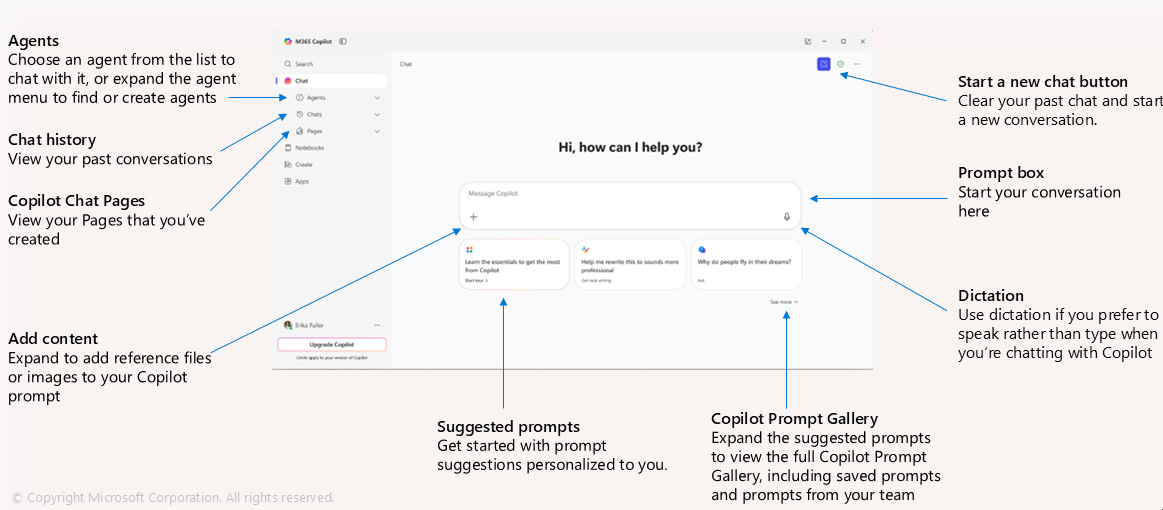
Your users get a single, standard starting point: go to M365Copilot.com, sign in with the work account, and confirm the green shield that indicates enterprise protection is applied. Microsoft also includes a mobile version of Copilot for users on either the Android or Apple smartphones. You can sign in with your same account, and even dictate to it and use while on the go.
What's Included (Fulcrum Managed Services "Copilot Chat Enablement")
Here's what we can do for you as part of a guided rollout:
Eligibility + Tenant Readiness Check
Validate your Microsoft 365 environment and who should have access to Copilot Chat. (Microsoft positions Copilot Chat as "secure, enterprise-ready AI chat" available at no additional cost with eligible subscriptions.)
Secure "Work Account" Setup (so protections apply)
We verify users are accessing Copilot Chat through their work identity and know what to look for (the green shield indicator).
User Experience Enablement
We help make access consistent (web app + Edge sidebar) and provide quick-start instructions. Our training presentation highlights access via M365Copilot.com and the new app experience. And of course, Microsoft makes Learn tracks available for many of their tools and technologies where you can read up on them.
Edge Sidebar "Read This Page / PDF" Configuration
If you want Copilot Chat to summarize the page you're viewing, we help users (or policy) enable the appropriate Edge setting to allow access to the current webpage/PDF.
Adoption Toolkit (Prompts + Use Cases)
We provide a starter pack of prompts to help teams understand how to: write better prompts, check sources, and refine outputs with follow-up instructions.
Lightweight Governance + Guardrails
We can assist with the development of a corporate or governmental AI Usage Policy so Copilot Chat becomes a trusted tool and users know their part: usage guidelines, what not to paste into any AI tool, when to validate sources, and how to escalate questions.
Roadmap to "What's Next"
When you're ready, we can help you expand into the full Microsoft Copilot for 365 experience: additional licensing is required, full Office 365 productivity suite integration, agents (templates and custom), connecting to shared org data, and more advanced Copilot capabilities.
Real-World Context / Proof
Microsoft publicly positioned Microsoft 365 Copilot Chat as free and secure AI chat for organizations, alongside IT controls like enterprise data protection. Organizations that do not learn how to use artificial intelligence will start to fall behind. But AI is such a different skill that the only way to really learn is via education and daily usage. And in the day-to-day reality: the “win” isn’t that AI exists—it’s that your entire organization has one approved place to start, with the right protections, and training that actually sticks.
Why Fulcrum Group
Because most companies don't fail at AI due to "technology"—they fail because of inconsistency:
Inconsistent Access
Inconsistent User Behavior
Inconsistent Policies
Inconsistent Results
Inconsistent Training
Inconsistent Usage
Fulcrum helps you turn Copilot Chat into a repeatable, safe business habit—and then expand from there. But organizational leaders need to be change agents to lead their firm into the future. Without their leadership and end-user comprehension, people tend to do what they've always done, which is learn as little as possible. By promoting, using, and talking about AI on a regular basis, more and more people start to “get it”. Then your organization starts to get the benefits of the results, people doing more and more consistently better-quality work.
Already a Fulcrum Managed Services Client?
Reach out to your fractional CIO and we'll help you get it turned on for all users with the right guardrails and a simple training launch plan.
Frequently Asked Questions
Is Copilot Chat really free?
Microsoft positions Copilot Chat as available at no additional cost for Microsoft Entra account users with an eligible Microsoft 365 subscription. Then users can use Copilot at copilot.microsoft.com, in the Copilot application, or as Copilot in the Microsoft Edge browser.
How do I know enterprise data protection is on?
Microsoft documents that Copilot Chat shows a green shield in the UI when enterprise data protection is applied.
Does Copilot Chat automatically see my Microsoft 365 files?
By default, Copilot Chat can use web information and your prompt context. Access to internal org data typically requires the right configuration (for example, using agents or enabling capabilities your admin allows). Our Copilot Chat training deck services for managed services users reinforces that connecting to org data depends on admin enablement.
Can Copilot Chat summarize a webpage or PDF I'm viewing?
Yes—when using the Edge sidebar, users may need to enable the setting that allows Copilot Chat to access the current webpage/PDF. Newer features of Copilot Edge even allow various tabs of Edge to be accessed for prompts.
What's the difference between Copilot Chat and the paid Microsoft 365 Copilot license?
Copilot Chat is the "secure AI chat for work" starting point. The paid Microsoft 365 Copilot license adds deeper integrations across apps like Teams/Outlook/Word/PowerPoint, etc. If you currently have files in server File Shares, the preferred step would be to migrate into SharePoint/OneDrive workloads, where they can be accessed via your Microsoft tenant. Microsoft even offers special bundles for smaller organizations to make it a little bit easier to get started with the full AI experience.