


AI adoption is happening in most organizations despite leaders. If you do not currently have an AI policy and standard, then your users are most likely going off on their own and potentially exposing your organization to risks. Your people need practical AI that fits how work already gets done, and needed it yesterday.
Microsoft 365 Copilot Business is a new SKU designed specifically for SMBs and cheaper than prior offerings. It embeds AI directly into Microsoft 365 apps your team already uses—Outlook, Word, Excel, PowerPoint, and Teams—without introducing new tools, new security gaps, or new workflows.
Copilot Business makes AI usable, governable, and scalable for everyday business operations.
The Reality Check
SMB leaders are facing a growing gap:
- Employees are already using AI—often outside approved systems and any kind of management
- When your users use "free" tools, then you are "the solution". That means that your content, uploads and prompts are being captured and used to improve those tools
- Public AI tools lack permission awareness and business context
- Productivity gains are inconsistent and hard to measure
- Security and data exposure concerns are increasing
- Leadership wants AI benefits without operational chaos
- You might be in violation of compliance when using AI for certain purposes, depending on your data and users
Copilot Business exists to close that gap by bringing AI inside your existing Microsoft environment.
The Product: Microsoft 365 Copilot Business
Microsoft 365 Copilot Business is an AI assistant built into Microsoft 365 that helps users:
- Draft, rewrite, and summarize emails and documents
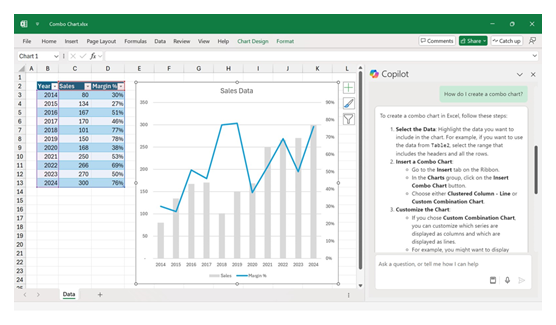
- Turn spreadsheets into insights using natural language
- Generate presentations and reports faster
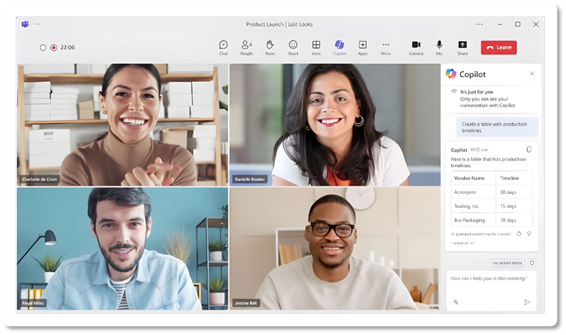
- Catch up on meetings, chats, and files instantly
- Search and act across work data from one interface
Key difference: Copilot respects your organization's existing permissions, identity, and security controls by design.
How Copilot Business Is Different
Built for Organizations
Not individuals
Embedded
Not bolted on
Permission-Aware
Not user-dependent
Governed
By Microsoft 365
Scalable
Across teams
This is why Copilot Business is fundamentally different from general-purpose AI tools.
What's Included in the Copilot Business SKU
Microsoft 365 Copilot Business includes:
- AI embedded in Word, Excel, PowerPoint, Outlook, and Teams
- Copilot app for chat, search, and task assistance
- AI grounded in your Microsoft 365 data
- Built-in security, compliance, and privacy protections
- No use of your business data to train foundation models
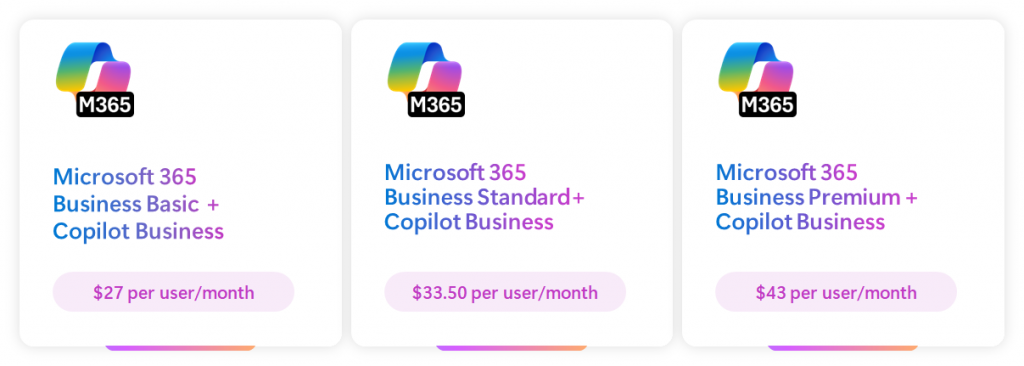
Copilot Business is licensed per user, per month, and pairs with Microsoft 365 Business plans.
Real-World Outcomes for SMBs
Organizations adopting Copilot Business typically see early gains in:
- Reduced time spent on email and meeting follow-ups
- Faster creation of proposals, reports, and presentations
- Improved clarity from data and spreadsheets
- More consistent execution across teams
- The biggest benefit isn't novelty—it's regained capacity
Why Buy Copilot Business Through Fulcrum Group
Copilot is a Microsoft product—but successful adoption is a leadership decision, not just a license purchase.
Fulcrum Group helps SMBs:
Validate Readiness
Before rollout
Reduce Risk
Oversharing and permission risk
Align Usage
To real business roles
Train Teams
On responsible usage
Ongoing Support
As usage scales
Local guidance. Accountable support. No IT Jerks.
Ready to Explore Copilot Business?
If you're evaluating Microsoft 365 Copilot Business for your organization, the next step is a short conversation. We'll confirm eligibility, review licensing options, and help you decide whether Copilot Business is the right fit for your team.
Frequently Asked Questions
What Microsoft 365 plans are eligible for Copilot Business?
Copilot Business is available for customers using Microsoft 365 Business Basic, Business Standard, or Business Premium.
Is Copilot the same as ChatGPT?
No. Copilot is a variety of services embedded in Microsoft 365 and respects your organization's existing permissions and security. ChatGPT is a general-purpose AI tool that operates outside your business systems.
Does Copilot use our data to train AI models?
No. Your data is not used to train foundation AI models.
Will Copilot show users confidential information?
Copilot only shows information a user already has permission to access.
Is Copilot worth it for small teams?
Yes. SMBs often see strong ROI because Copilot reduces administrative work without requiring new hires.
Is ChatGPT still useful if we're adopting Copilot Business?
Yes. ChatGPT remains a very effective tool—especially for individual ideation, creativity, and fast experimentation. Many professionals use ChatGPT for brainstorming, writing drafts, and exploring ideas quickly without needing deep system integration. There are deep roots in the marketing community.
Do we need to clean up our data before deploying Copilot?
You don't need a perfect environment—but you do need a responsible baseline or simply controlling which users get access. Copilot uses your existing Microsoft 365 data and permissions, so cleaning up obvious oversharing and outdated access before rollout reduces risk and improves results. We can also turn off access to SharePoint data for those environments that are extremely concerned about data access, and Copilot will still be able to access Exchange emails and Teams content as well as manually uploaded files.
Why do traditional file shares matter when deploying Copilot?
Copilot works best with content stored in Microsoft 365 cloud services like SharePoint, OneDrive, and Teams. Data stuck in legacy on-prem file servers and shares should be moved to the cloud for visibility, modern permission models, and governance.
Do we need to eliminate file shares to use Copilot?
Not immediately as AI like all technologies is really a journey. However, organizations that rely heavily on legacy file shares often experience limited Copilot value and higher governance risk. Migrating active workloads to the cloud improves access control, collaboration, and Copilot effectiveness.
Why do permissions matter so much with Copilot?
Copilot only shows users what they already have access to. Loose or missing permissions can provide unanticipated access to any user with a Copilot license. If someone can see a file today, Copilot can summarize or reference it tomorrow. That's why permission hygiene is one of the most important steps in a successful deployment and why we recommend data governance services to assist with the journey.
Do we have to delete old data to use Copilot safely?
Not necessarily. The goal isn't mass deletion—it's intentional retention. Many organizations choose to archive or restrict access to old content instead of deleting it, so valuable history is preserved without being broadly accessible.
How does Copilot protect our data and privacy?
Microsoft 365 Copilot is built with high-grade privacy protections. Your organization's data stays within your Microsoft 365 environment and is governed by the same security, identity, and compliance controls you already use today. Your data stays in your tenant and is not used to improve Microsoft or provide them access. Additionally, individual users' queries are protected from other users. Individuals can also utilize their Microsoft personal account to separate any Copilot queries from the centrally managed tenant organization.