

It Started With a Perfectly Normal Email
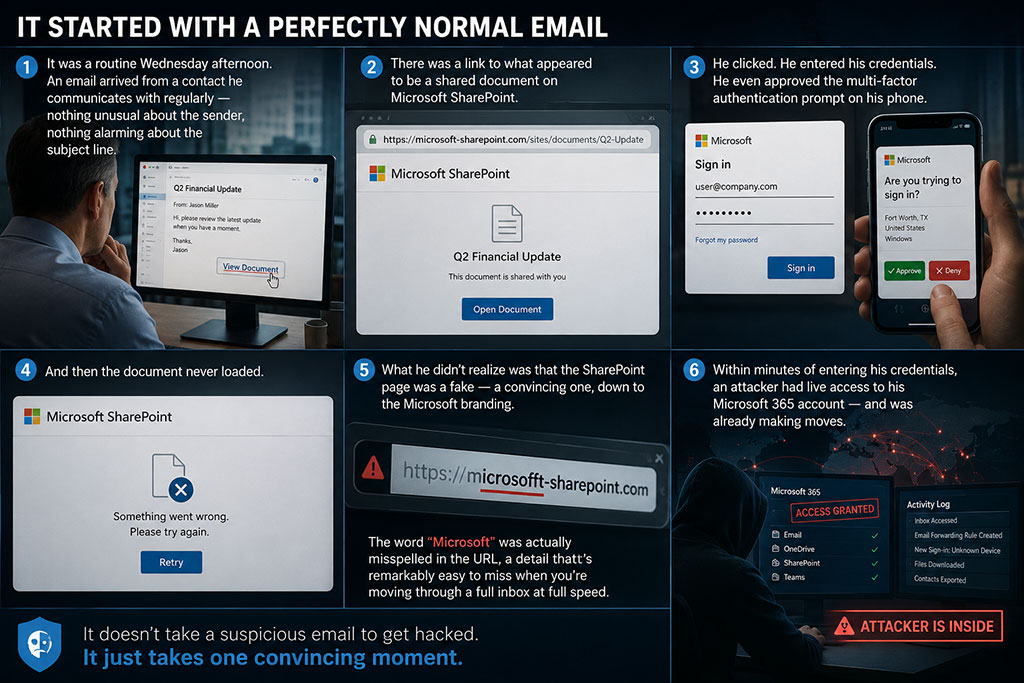
For the president of a Fort Worth-based financial services firm, it was a routine Wednesday afternoon. An email arrived from a contact he communicates with regularly — nothing unusual about the sender, nothing alarming about the subject line. There was a link to what appeared to be a shared document on Microsoft SharePoint.
He clicked. He entered his credentials. He even approved the multi-factor authentication prompt on his phone.
And then the document never loaded.
What he didn't realize was that the SharePoint page was a fake — a convincing one, down to the Microsoft branding. The word "Microsoft" was actually misspelled in the URL, a detail that's remarkably easy to miss when you're moving through a full inbox at full speed.
Within minutes of entering his credentials, an attacker had live access to his Microsoft 365 account — and was already making moves.
How the Attack Escalated in Real Time
This wasn't a smash-and-grab. Attackers who compromise a Microsoft 365 account often move methodically and fast.
Using the stolen credentials, the attacker created a brand-new admin account inside the company's M365 environment and began assigning it Global Administrator privileges. With that level of access, they could have done just about anything:
- Accessed and exfiltrated sensitive financial data
- Modified security settings to lock out legitimate users
- Set up persistent backdoor access for future attacks
- Disabled security policies or logging to cover their tracks
This is the kind of breach that can bring a small business to its knees. And it all unfolded in a matter of minutes — not days.
Proactive Monitoring Caught What the Human Eye Missed
Here's where the story takes a different turn than most breach stories do.
This Fort Worth firm had The Fulcrum Group managing their IT environment. As part of their SPOT Managed IT Services, Fulcrum had 24/7 security monitoring active on their Microsoft 365 tenant. The moment the suspicious account creation and privilege escalation occurred, automated alerts fired.
The compromised account was immediately disabled — stopping the attacker in their tracks before any meaningful damage could be done.
No human was staring at a dashboard. The system caught it. That's the point.
The Minute-by-Minute Response
What happened next illustrates what rapid incident response actually looks like in practice:
| Time | Action |
|---|---|
| 1:51 PM | Alerts flagged internally at The Fulcrum Group |
| 1:55 PM | Fulcrum engineer takes ownership, begins investigation |
| 1:58 PM | Engineer calls client twice, leaves voicemail explaining the situation |
| 2:03 PM | Rogue admin account disabled |
| 2:14 PM | Client calls back; engineer walks him through the incident, resets password, cleans up authentication methods, re-enables legitimate account; unauthorized admin account deleted |
| 2:24 PM | Global Admin roles removed from all regular user accounts as a preventive measure |
| 3:03 PM | Security monitoring confirms incident fully resolved |
Total time from detection to full resolution: just over one hour.
That's not a dramatic claim — it's a timestamped record.
What Made This Attack So Effective (and So Common)
It's worth pausing here, because a lot of business owners still picture phishing as poorly written emails from strangers claiming to be Nigerian royalty.
This was not that.
This attack succeeded in bypassing initial skepticism because it came from a real, trusted contact — whose own account had very likely been previously compromised, making this part of a broader chain. The SharePoint look-alike was convincing enough to pass a quick visual inspection. And the MFA prompt? It was captured and relayed in real time by the attacker's infrastructure — a technique known as adversary-in-the-middle (AiTM) phishing, which is increasingly common in credential theft targeting Microsoft 365 users.
According to Microsoft's Digital Defense Report, phishing remains one of the leading initial access vectors for enterprise and SMB breaches globally, with AiTM-style attacks representing a growing share of M365-targeted incidents. (Source: Microsoft Digital Defense Report)
Smart, experienced professionals get caught by these attacks every single day. It's not a training failure — it's a threat landscape that has fundamentally evolved. The answer isn't more skepticism from employees. The answer is better detection infrastructure.
No Data Lost. No Damage Done.
Because of the speed of detection and the team's response, the attacker never gained a meaningful foothold. The summary:
- No data was exfiltrated
- No additional accounts were breached
- No business operations were disrupted
- The client's environment came out more secure than it went in — with tighter access controls and unnecessary admin privileges removed
That last point is worth emphasizing. A well-handled incident response doesn't just stop the bleeding. It identifies and closes the systemic gaps that made the incident possible in the first place.
How Fulcrum Approaches Security for DFW Organizations
What made the difference in this incident wasn't luck, and it wasn't one brilliant engineer. It was a combination of:
- Proactive monitoring configured to detect anomalous activity the moment it happens — not the next business day
- Defined response protocols so the right person is notified, and acting, within minutes
- Client communication that's fast and human — a real person on the phone, walking a stressed business owner through exactly what happened and what was done
This is what SPOT Managed Security Services is built around. And it's central to how Fulcrum's STARPower™ framework approaches IT for DFW clients — not as a reactive break-fix relationship, but as a co-managed model where security posture is continuously assessed, improved, and tested against real-world threat patterns.
For organizations using Microsoft 365 — which is virtually every SMB and local government entity in the Dallas–Fort Worth area — Microsoft Copilot and M365 security configurations are an increasingly important part of that posture.
The client's own reflection after the incident said it best:
"Cybersecurity is not just about having the right tools. It's about having a team that monitors, responds, and acts fast when it matters most."
He was so confident in the value of what happened that he offered to share his story publicly — so other business owners could understand what real IT partnership looks like.
Key Takeaways
- Phishing emails don't always look suspicious. Modern attacks use real sender identities, convincing spoofed interfaces, and trusted brand names. If a contact's account has been compromised, the email you receive from them looks completely legitimate.
- MFA is essential, but not bulletproof. Adversary-in-the-middle phishing can capture both credentials and MFA approvals in real time. Additional layers — like conditional access policies and anomaly detection — are necessary.
- Speed of response is the deciding variable. The difference between a contained incident and a catastrophic breach often comes down to minutes, not hours. Automated detection and defined escalation protocols matter enormously.
- Proactive monitoring is not optional for serious businesses. Without it, a breach like this could go undetected for days — long enough to cause lasting damage to clients, data, and reputation.
- Principle of least privilege applies to admin accounts. Regular user accounts should never carry Global Admin access. Separate, tightly controlled admin accounts with additional protections are a baseline best practice.
Ready to Know If Your Organization Is Protected?
If a phishing attack hit your Microsoft 365 environment right now, would your IT team detect it within minutes and have it resolved within the hour?
If the answer is "I'm not sure" — it's time to find out.
The Fulcrum Group provides SPOT Managed IT and Security Services with proactive monitoring, rapid incident response, and continuous security hardening for businesses and local government organizations across the Dallas–Fort Worth metroplex.
Schedule a conversation with the Fulcrum team →
Or call us directly: 817-337-0300
Frequently Asked Questions
What is a Microsoft 365 phishing attack?
A Microsoft 365 phishing attack is a cyberattack in which a criminal tricks a user into entering their M365 login credentials on a fake website that mimics Microsoft or a familiar platform like SharePoint. Once the attacker has the credentials, they can access the victim's email, files, contacts, and — in some cases — the broader Microsoft 365 tenant if admin privileges are obtained.
Can phishing attacks bypass multi-factor authentication (MFA)?
Yes. A technique called adversary-in-the-middle (AiTM) phishing allows attackers to intercept credentials and MFA approvals in real time by proxying the victim through a fake login page. MFA remains an important security layer, but it should be combined with anomaly detection, conditional access policies, and account monitoring for stronger protection.
How quickly can a Microsoft 365 account compromise escalate?
Extremely quickly. In the real incident described in this post, an attacker went from gaining access to a user's account to creating a new Global Admin account in minutes. This is why detection speed and automated response are so critical — human-only monitoring cannot react fast enough to contain these threats before damage is done.
What is SPOT Managed Security Services from The Fulcrum Group?
SPOT Managed Security Services is The Fulcrum Group's proactive security offering for DFW businesses. It includes 24/7 monitoring of your IT environment, automated threat detection and response, ongoing security hardening, and dedicated engineer support — so threats are identified and contained before they become breaches.
What should a DFW small business do after a phishing attack?
Immediately contact your IT provider or managed security team. Disable the compromised account to prevent further attacker activity. Reset passwords and revoke active sessions. Audit admin accounts and permissions. Review email forwarding rules and authentication methods for tampering. Document the incident timeline. Once contained, use the incident as an opportunity to close systemic gaps — such as removing unnecessary admin privileges and implementing stronger conditional access policies.
How does The Fulcrum Group's STARPower™ framework address cybersecurity?
STARPower™ is Fulcrum's structured process for co-creating IT success with DFW clients. Rather than treating security as a one-time setup, the framework builds continuous assessment, planning, and improvement into the ongoing relationship — so clients' security posture evolves alongside the threat landscape, not behind it.
Is Microsoft 365 security a concern for local governments in Texas?
Absolutely. Municipal governments and local government entities in the DFW area are increasingly targeted by phishing and ransomware attacks because they often hold sensitive citizen data and may have less mature security infrastructure than larger enterprises. Fulcrum's Local Government IT services are specifically designed to address these challenges with the monitoring and response capabilities that public-sector organizations need.