


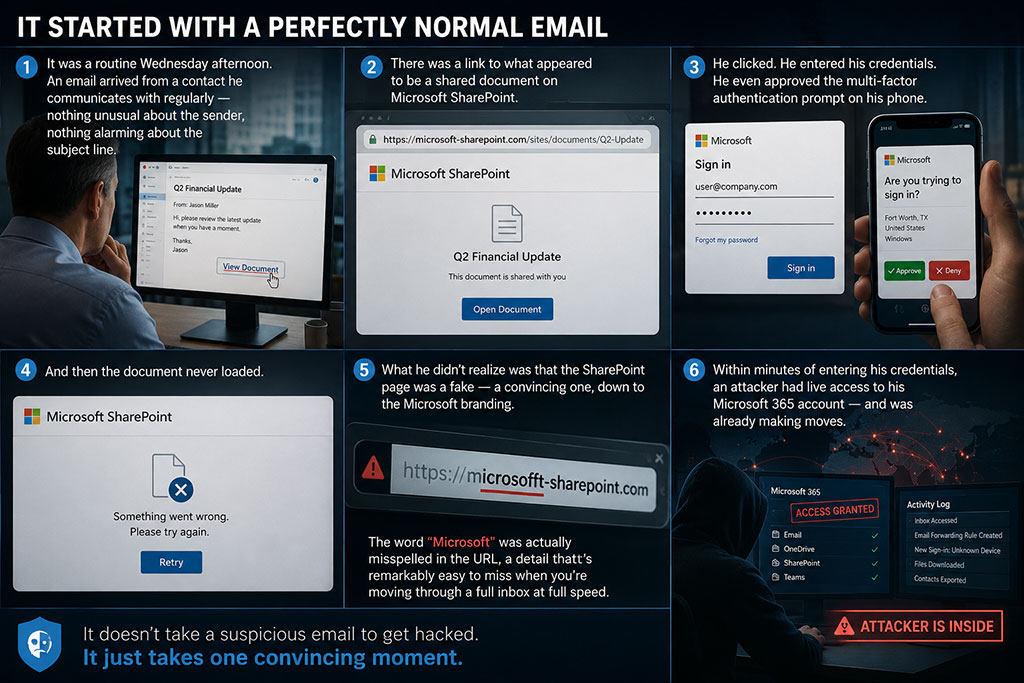
You can spot most phishing emails by slowing down and checking five things: who really sent it, whether it creates urgency, where the links actually go, what it asks you to do and whether it fits how that person or company normally contacts you. If anything feels off, verify through a phone number or website you already know.
That advice sounds simple because it is. The hard part is following it at 4:30 on a busy afternoon when the email looks exactly like the hundred legitimate ones you’ve already handled that day. Phishing is still the most common way attackers get a foot in the door. The FBI’s 2025 Internet Crime Report, released in April 2026, listed phishing and spoofing among the most frequently reported complaints in a year with over one million complaints and nearly $21 billion in losses. Below are the red flags we coach teams on around Dallas-Fort Worth, with examples of what each one looks like.
What is a phishing email?
A phishing email pretends to come from someone you trust so you’ll click a link, open an attachment, enter a password, send money or share information. The sender might pose as Microsoft, your bank, a shipping company, a vendor, a coworker or your own CEO. Phishing also comes by text (smishing), phone call (vishing), Teams chat and even QR codes printed on paper.
What are the red flags of a phishing email?
1. The sender’s address doesn’t match the name
The display name says “Microsoft 365 Support,” but the actual address is something like m365-support@outlook-secure-notice.com. On a phone, tap the name to see the full address. Look for small misspellings too, like rnicrosoft.com (that’s an “r” and an “n,” not an “m”).
2. It creates urgency or fear
“Your mailbox will be deleted in 24 hours.” “Final notice before legal action.” Pressure is the attacker’s favorite tool because rushed people skip the checking step. The FBI’s own advice in the 2025 report boils down to “take a beat” before you act.
3. The link goes somewhere unexpected
Hover over a link on a computer, or press and hold on a phone, to preview the real destination. A message that claims to be from DocuSign but links to docs-review-share.co is a problem. Watch for login pages hosted on free file-sharing or form sites too.
4. It asks you to sign in to see something
“You have a new voicemail. Sign in to listen.” “A document has been shared with you.” Fake Microsoft 365 login pages are among the most common phishing pages we see. If you’re asked for your password after clicking an email link, close the page and go to the site directly.
5. There’s an unexpected attachment
Be wary of invoices, “scanned documents,” HTML files, ZIP files and anything that asks you to enable macros or editing. If you weren’t expecting it, confirm with the sender before opening it.
6. It asks for money, gift cards or banking changes
Any request to pay a new account, update a vendor’s bank details or buy gift cards should be verified by phone using a number you already have. This is the core of business email compromise, which our BEC guide covers in detail.
7. The tone or timing doesn’t fit
Your CFO doesn’t usually email at 11 p.m. on a Saturday asking for a favor. Your bookkeeper has never signed off with “Kind regards.” Attackers can copy a logo, but they often miss how a person actually writes.
8. It’s generic, or oddly specific
Old phishing said “Dear Customer.” Newer phishing may use your name, title and a real project pulled from LinkedIn or your website. Personal details don’t prove an email is real.
9. It includes a QR code
A QR code in an email asking you to “re-verify MFA” or “view your W-2” is a classic trick to move you from a protected work computer to a less protected personal phone. Real IT teams rarely ask you to scan a code from an email.
10. It asks you to paste or run something
A fake “verify you are human” page tells you to press a few keys, paste a command and hit Enter. That’s a technique called ClickFix, and it runs malware on your own computer. No legitimate website will ever ask you to do this.
What do phishing emails look like? Three examples
These are made-up examples based on common patterns, not real messages.
From: Microsoft 365 <no-reply@m365-mailcenter.net>
Subject: Action required: 3 messages held in quarantine
Your mailbox has blocked 3 incoming messages. Review them within 24 hours or they will be permanently deleted. [Review Messages]
Red flags: outside domain, 24-hour pressure and a link to a login page.
From: Jim Davis (CEO) <jim.davis.office@gmail.com>
Subject: Quick favor
Are you at your desk? I’m in meetings all afternoon and need you to handle something for a client today. Keep this between us for now.
Red flags: personal email for a business request, secrecy and urgency. The next message usually asks for gift cards or a wire.
Text message: Toll Services: You have an unpaid toll balance of $6.85. Pay today to avoid a $50 late fee: [link]
Red flags: a small amount to seem harmless, a late fee threat and a link that isn’t your toll agency’s real site. Federal and state officials warned about these unpaid-toll texts in 2025. Around the metroplex nearly everyone has a toll tag, which is exactly why the scam works here.
What are the latest phishing scams in 2026?
The basics haven’t changed, but the packaging has improved a lot.
- AI-written phishing. The Microsoft Digital Defense Report 2025 found AI-automated phishing emails got a 54 percent click-through rate, compared with 12 percent for traditional ones. Bad grammar is no longer a dependable tell.
- ClickFix and fake CAPTCHAs. In the same report, Microsoft said ClickFix was the most common initial access method its Defender Experts saw, at 47 percent of attacks.
- Phone and text attacks. Verizon’s 2026 Data Breach Investigations Report found mobile social engineering through texts and calls succeeds about 40 percent more often than email phishing. Fake “help desk” calls and Teams messages asking you to approve a sign-in or install remote support tools are part of this trend.
- Volume keeps climbing. The Anti-Phishing Working Group counted 971,181 phishing attacks in the first quarter of 2026, up 13.8 percent from the quarter before.
What should you do if you clicked a phishing link?
Act fast and don’t be embarrassed. Smart, careful people get fooled every day.
- Disconnect from Wi-Fi or unplug the network cable if you opened an attachment or ran anything.
- Call your IT provider or internal IT right away. Calling beats emailing in this case.
- Change your password from a different, clean device if you entered it anywhere.
- Tell your bank immediately if you sent money or payment details. Speed matters for any chance of recovery.
- Report it. Use the “Report” button in Outlook, and file with the FBI’s IC3 if money was lost.
How do you protect your business from phishing?
No single tool stops everything, so we layer it. Email filtering and the security features in Microsoft 365 catch a lot. Multifactor authentication limits the damage when a password leaks. A clear rule that money changes are always verified by phone stops most payment fraud. And regular practice matters. Our guide to how often employees should get cybersecurity training lays out a cadence that works for most teams. The goal is a culture where reporting a suspicious email is quick, easy and appreciated.
Frequently asked questions
How can you tell if an email is phishing?
Check the sender’s full address, hover over links before clicking and be suspicious of urgency, unexpected attachments, login requests and any request for money or banking changes. When in doubt, verify through a phone number or website you already know.
What is the most common type of phishing email?
Fake login and credential-harvesting emails, often pretending to be Microsoft 365, DocuSign, a shipping company or a shared document, are among the most common. Payment and invoice scams are the most costly for businesses.
Can you get hacked just by opening a phishing email?
Usually not just by opening it. The risk comes from clicking links, opening attachments, scanning QR codes, entering passwords or following instructions in the message. Still, report it and delete it.
What should I do if I entered my password on a phishing site?
Change that password immediately from a clean device, change it anywhere else you reused it, make sure multifactor authentication is on and tell your IT provider so they can check for suspicious sign-ins.
Is AI making phishing harder to spot?
Yes. AI lets attackers write polished, personalized messages in seconds, so spelling mistakes are no longer a dependable clue. Focus on the request itself and verify anything involving passwords, money or urgency.
How The Fulcrum Group helps
We help North Texas organizations cut phishing risk from both sides: the technical controls that stop most bad email before it lands and the people habits that catch what gets through. Through SPOT Managed Security Services, that includes email protection, MFA, simulated phishing and fast help when someone does click. Nobody gets shamed. We just get it handled.
If you’d like to know how your team would hold up against a real phishing attempt, Schedule a Discovery Call.

