


Empower Your Future of Work: Unleash Copilot for Microsoft 365's Potential with The Fulcrum Group's Cutting-Edge Services
Copilot for Microsoft 365
In today’s fast-evolving digital landscape, staying ahead of the curve is crucial for any business aiming to thrive. The Fulcrum Group understands this imperative and is excited to offer services that maximize the potential of Microsoft 365’s revolutionary Copilot feature. By integrating AI-driven insights and automation into your daily workflows, Copilot transforms how you operate, collaborate, and innovate

- Copilot for Microsoft 365
- Need help preparing for Copilot 365?
- Requirement Tips
- Deployment Tips
- IT administrator Tips
- Skip all the hustle
- Three-phase approach to business progress
- Readiness
- Adoption
- Measurement
- Prepare for Copilot with a Microsoft Copilot Readiness Assessment
- What to expect from a Remediation Plan
- Copilot for Microsoft 365 is transforming work
- Top 10 new user tips- Copilot for Microsoft 365
- Prompts do's and dont's
- what can Copilot Do for you
- Replace AI outside your control with better AI and controls that business users need
- Don't Take Our Word for It
- Meet our Forth Worth team
- what our clients have to say
- They Believe In Us
- drop us a line and keep in touch
Need help preparing for Copilot 365?

Readiness and Requirements

Copilot for Microsoft 365 is transforming work
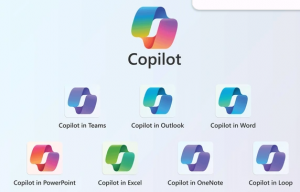
How it works?
Focus on what matters most
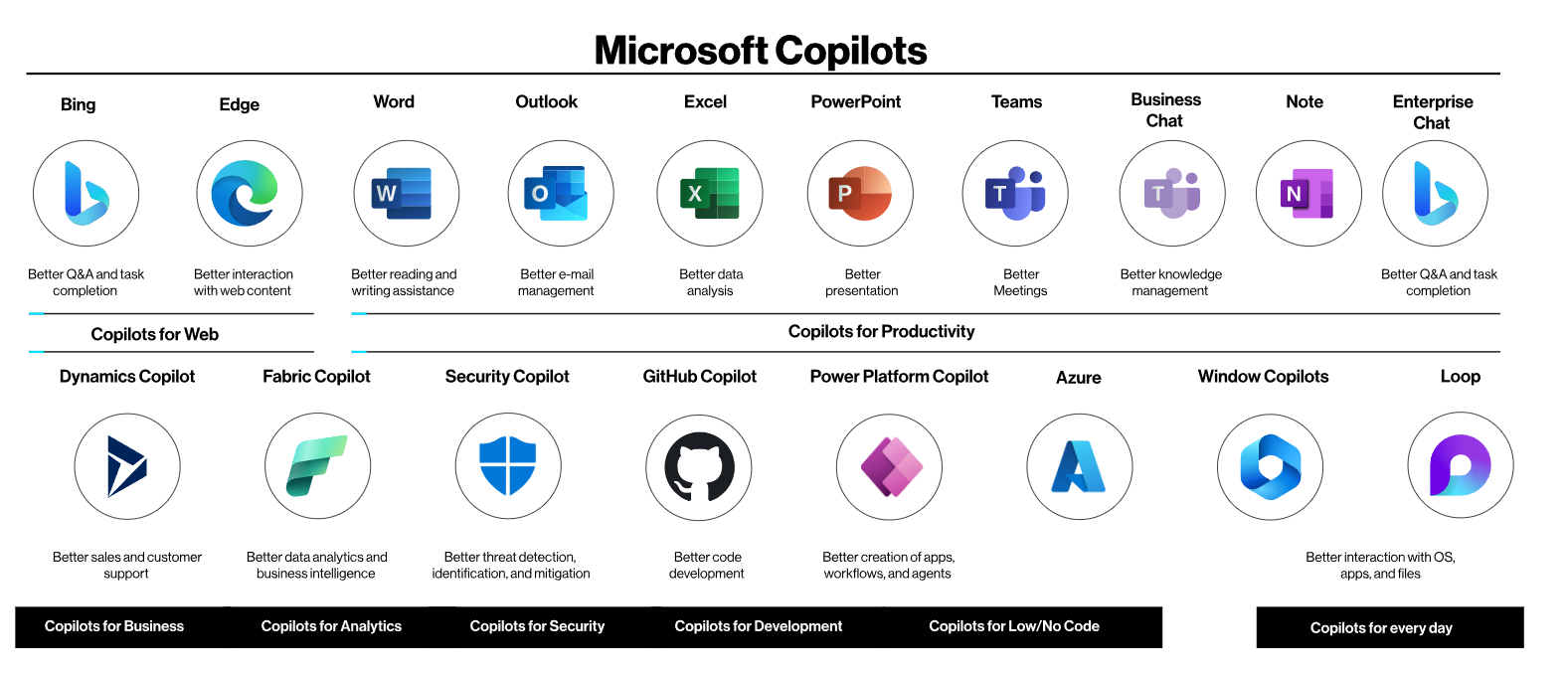
Microsoft has incorporated AI-driven copilots into its flagship offerings, revolutionizing coding efficiency via GitHub, transforming workplace productivity with Microsoft 365, redefining search experiences with Bing and Edge, and delivering seamless contextual value across applications and PCs with Windows.
Copilot is now accessible within Microsoft 365, providing a comprehensive AI companion that seamlessly integrates web context, work data, and real-time PC activity to offer enhanced assistance while prioritizing privacy and security.
It’s not an exaggeration to say that this suite of generative AI tools within the Microsoft 365 suite fundamentally alters the way we work. But what exactly is it? How will it enhance both organizations and employees? And what factors should be considered before implementation?
Requirement Tips
- Active Microsoft 365 Apps
- Microsoft Entra ID
- License requirements
- Office Feature Updates task
- Microsoft OneDrive
Deployment Tips
- Assign licenses
- Send welcome email
- Enable feedback
- Microsoft Copilot for Microsoft 365 usage activity report
IT administrator Tips
- Microsoft 365 Business Standard, Business Premiun, E3, or E5 are licensing prerequisites.
- Entra ID- based account is required.
- Must buy and assign the license to user and they must sign in with that account
- Install may experience issues if company managing updates, you have volume license install or you might need to Update License in one of your apps
- Several features require users to have a OneDrive account
- Download newest versions of Office 365 from tenant and install. NOTE: Outlook Copilot requires “New” version for functionality.
- The richness of the cross-app experience will depend on the data sources indexed by Microsoft 365. Tenants with the richest data in Microsoft 365 (Exchange, OneDrive, SharePoint, Teams) will get the best result
Skip all the hustle
What you need to know first about Copilot
Three-phase approach to business progress
Copilot for Microsoft 365 works alongside you in the apps used every day delivering increased productivity and creativity as you are set free from repetitive tasks so you can focus on the work that matters most – like serving your customers and growing your business – all with the peace of mind coming from our commitment to security and responsible AI.


Readiness
- Project- Copilot Readiness Assessment
- Decide licenses strategy
- Start with quick wins
- Manage expectations
- Build feedback loops
- Set the stage for success

Adoption
- Project- Copilot Security and Policy Remediation
- Target specific knowledge workers and / or leaders as your Copilot champions and early adopters
- Communicate best practices early and often

Measurement
- Celebrate champion successes and brainstorm where else useful, new uses
- Quantify impact with the Microsoft Copilot Dashboard
- Meet with your AI council regularly
- Publicly celebrate successes
Prepare for Copilot with a Microsoft Copilot Readiness Assessment
As AI tools have gained widespread adoption over the past year, concerns about the safety and security of data have surfaced. In response, Microsoft introduces Microsoft Copilot, an innovative AI-powered tool designed to offer real-time guidance, insights, and automation across various organizational tasks and roles.
To kickstart your journey with Copilot, we’re offering the Microsoft Copilot Readiness Assessment. This service is tailored to assist organizations in adopting and optimizing Microsoft Copilot, specifically targeting companies already utilizing Microsoft 365 with active usage and subscriptions.
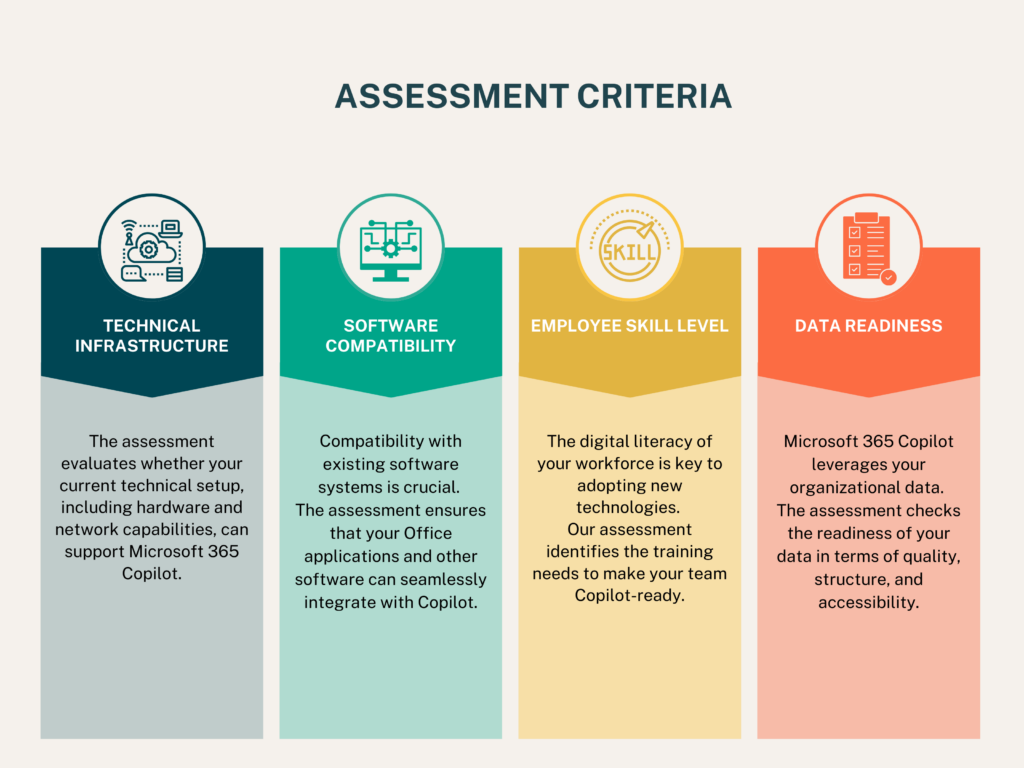
Microsoft Copilot for Microsoft 365 aims to revolutionize how we work. However, for organizations integrating Copilot into their systems, there are potential risks to be mindful of.
Since Copilot leverages your SharePoint tenant for accessing knowledge, it’s crucial to ensure that your tenant is configured with the appropriate permissions. Preventing unauthorized access is paramount; for instance, you wouldn’t want Copilot to disclose sensitive information like your CEO’s salary upon command.
Initial Remediation Plan will correct past vulnerabilities but not future ones without ongoing efforts .
- Technical Readiness Verification: Ensure all essential Microsoft 365 applications are installed and kept up to date. Prepare your infrastructure to meet the requirements of Microsoft Copilot effectively.
- Customization to Suit Your Requirements: Utilize Microsoft Copilot Studio to customize Copilot’s functionalities to align with the specific workflows and industry demands of your organization.
- Emphasis on Training and Adoption: Provide thorough training sessions for users, highlighting the tangible benefits and features of Microsoft Copilot. This emphasis will facilitate a seamless adoption process and maximize the utilization of the tool within your organization.
What to expect from a Remediation Plan
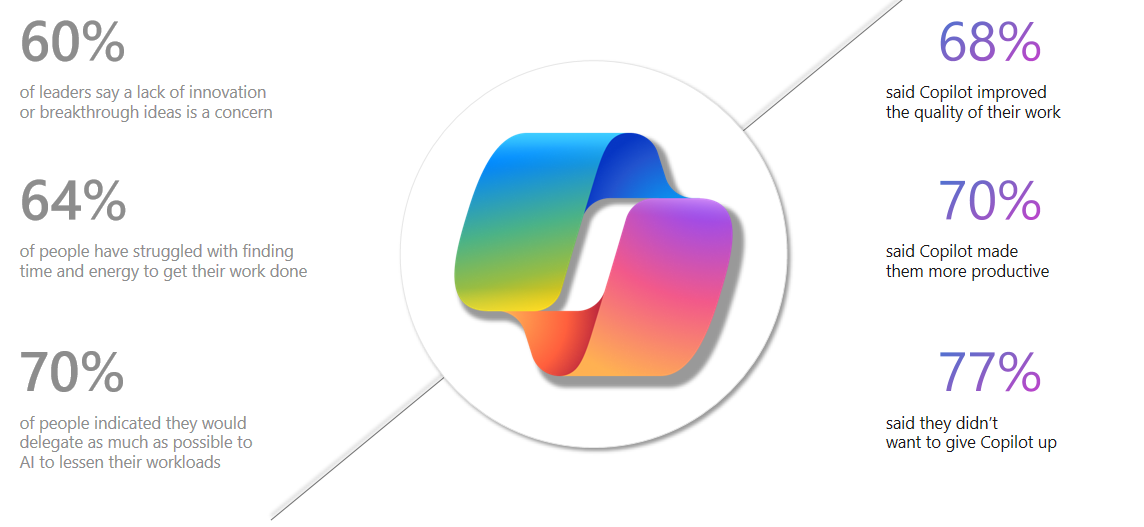
Copilot for Microsoft 365 is transforming work
Source: Work trend Index Annual Report: Will AI Fix Work? Microsoft. 9 May 2023 | Microsoft Work Trend Index: What can Copilot’s Earliest Users Teach Us About Generative AI at Work?: Microsoft. 15 November 2023
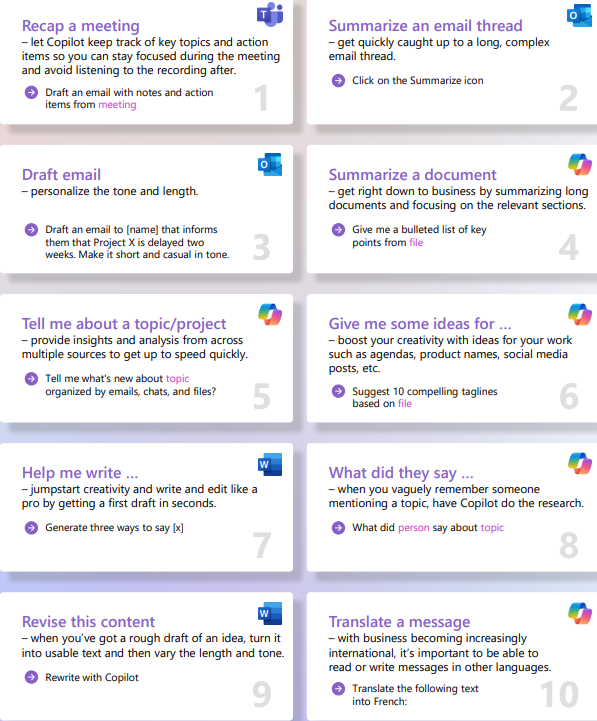
Top 10 new user tips- Copilot for Microsoft 365
Prompts do's and dont's
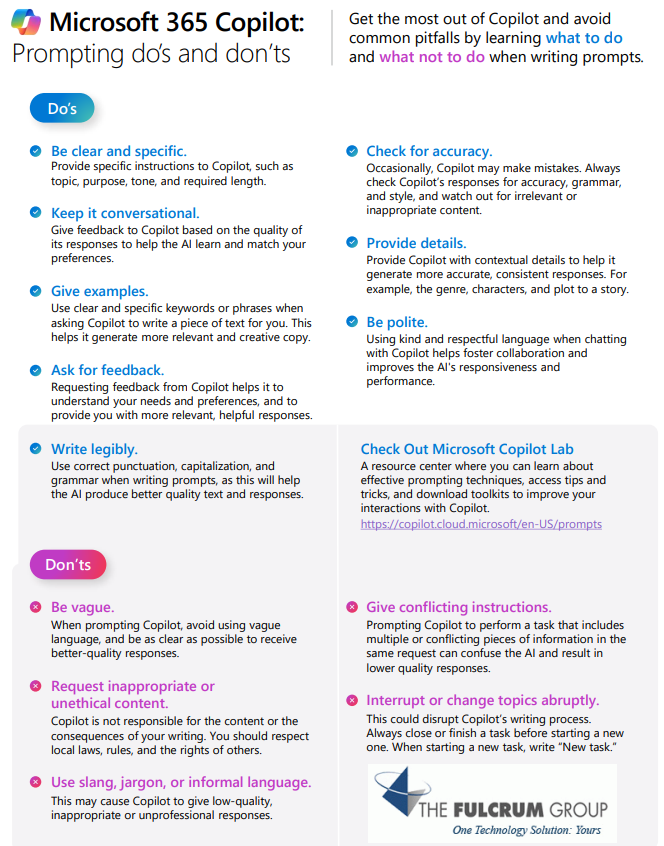
For more prompts, visit Copilot Lab at: aka.ms/CopilotLab
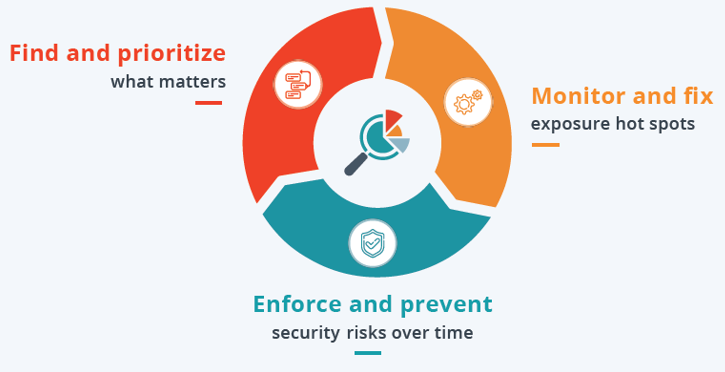
Focus on what matters most
What can Copilot Do for you
Supercharged productivity
Unlock access to data and knowledge across your organization
- Deliver better customer service with Outlook
- Stay caught up with Teams
- Laser focus on what matters most
Amplified creativity
Amplify human ingenuity and innovation with AI
- Land more deals and grow your customer base more creatively and effectively with Word and PowerPoin
- Think faster with Excel
- Make meetings more creative with Whiteboard

Trusted security
Count on responsible, secure AI from a partner you can trust including Microsoft’s Copilot Copyright Commitment
- Remain in control
- Stay grounded and protected
- Access better answers more efficiently and securely
Replace AI outside your control with better AI and controls that business users need
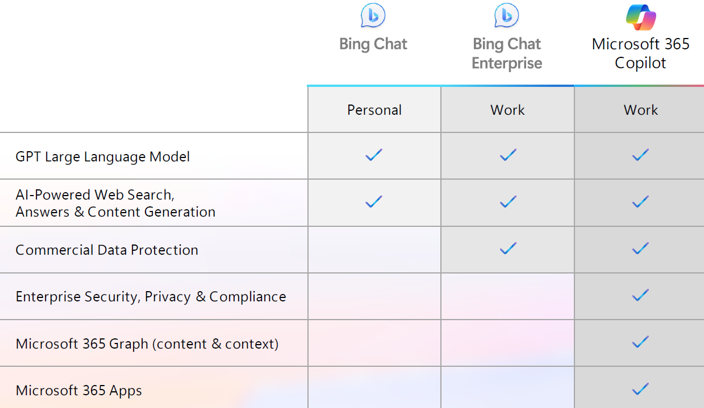
As an IT administrator, everybody else’s emergency is your emergency. Enter Copilot, formerly Bing Chat Enterprise, an AI-powered web chat solution that seamlessly integrates with Microsoft 365 (yes like Chat GPT and even based on Open AI GPT-4).
The beauty is it gives you:
– User-Level Admin Controls to deploy it org or a few users. for feedback, you have the flexibility to tailor the experience.
– Data Protection that sees the Internet and can add your tenant data, but behind your information barriers.
– Seamless Integration protected by your policy settings.
Users can go to https://copilot.microsoft.com/, You can add it into their Edge browser sidebar or they can add an app to their smartphone and take it with them
Tinker with Copilot today and see how it can replace the search engine as your “go to” for research. Did we mention it is FREE for basic?
Don't Take Our Word for It
Read Our Rave Reviews!

Our work inspires smiles
Meet our Fort Worth team
Focus on what matters most with Copilot for Microsoft 365 and the power of AI
Drop us a line and keep in touch