


Ask anyone in your company why a particular thing is done the way it is done. If the answer is that’s how we’ve always done it, you have found something worth ten minutes of your attention.
Most of what a 40-person company carries from one year into the next was never decided. It is a workaround from 2019 that outlived the problem it solved. A machine that still turns on. Something that breaks twice a year and gets fixed twice a year, because fixing it is cheaper than the conversation about replacing it.
None of it appears in a budget meeting, because none of it is a line item. It is just how things are.
Here is how to find it before it follows you into 2027.
1. Start with the workarounds nobody questions anymore
Every company has a few. They were sensible once — a sincere answer to a real problem — and then the problem went away and the answer stayed.
Two that turn up constantly in businesses this size:
The same information typed into two systems. Somebody enters a job into the operations or job management system, and then somebody enters the same job into accounting. There was a reason for that once: the two systems did not talk, or the integration cost more than a few hours of labor a week. Both of those facts may have changed three years ago. Nobody rechecked, because the person doing the typing is not the person who would evaluate the integration.
The spreadsheet that became infrastructure. Someone built a tracker for overdue invoices in 2021 because the reports in the accounting package were awkward. Five years later three people update it, it is the number quoted in meetings, and it lives on one person’s desktop with copies in two mailboxes.
The test for both is one question, asked out loud: what actually breaks if we stop doing this?
If the room can answer it crisply, the workaround is earning its keep. If nobody is sure — and that is the common outcome — you have found work that exists because it has always existed.
The part of this that is a Texas data problem
That invoice spreadsheet is not just duplicated effort. It is a copy of your customer data living in a place nobody inventoried.
Texas has a comprehensive privacy statute now — Chapter 541 of the Business & Commerce Code, the Texas Data Privacy and Security Act, in effect since July 1, 2024. Most companies reading this are exempt from most of it, and it is worth being precise about why, because the exemption is less tidy than it sounds.
§541.002(a)(3) applies the chapter only to a person that “is not a small business as defined by the United States Small Business Administration.” The SBA does not have one definition. It has a table organized by NAICS code — some industries measured in employees, some in average annual receipts, with affiliated companies counted together. A 60-person firm can sit comfortably inside the limit for one industry code and outside it for another, and the SBA has had revisions to its receipts-based standards in motion through 2025 and 2026. “We’re small, so it doesn’t apply” is a conclusion, not an assumption.
Two things are worth knowing either way:
- §541.107 applies to exempt small businesses anyway. A business that is otherwise out of scope still may not sell sensitive personal data without the consumer’s prior consent — and “sell” in this chapter means disclosure for valuable consideration, not only for cash.
- If you are not exempt, §541.101(a)(1) requires limiting collection of personal data “to what is adequate, relevant, and reasonably necessary in relation to the purposes for which that data is processed,” and (a)(2) requires reasonable administrative, technical and physical security practices. Enforcement belongs to the Attorney General alone (§541.151), following a cure period (§541.154), with civil penalties of up to $7,500 per violation (§541.155).
The reason this belongs in a post about workarounds: you cannot limit what you cannot find. Shadow copies of customer data are created by well-meaning people solving ordinary problems, and they are invisible precisely because they were never a project.
We’re an IT firm, not a law firm. Whether Chapter 541 reaches your business is a question for your attorney — and the answer turns on your NAICS code, not your gut feel about your size.
2. “Still works” and “works well” are not the same sentence
There is an employee somewhere in your building who starts their computer and then goes to make coffee. Not because they want coffee. Because they have learned that the machine needs those four minutes, and standing there watching it is worse.
That machine works. Ask anyone and they will tell you it works. It has never failed.
Put a number on it anyway.
Say the boot, the login and the first three applications cost seven minutes a day. Over 240 working days that is 28 hours a year. The mean hourly wage across all occupations in the Dallas-Fort Worth-Arlington metro was $33.96 in the Bureau of Labor Statistics’ May 2025 estimates, slightly above the national $33.54. Twenty-eight hours at that rate is about $950 a year, for one person.
An honest caveat, because the arithmetic is ours and it cuts both ways. Recovered minutes are not automatically recovered money — nobody bills the four minutes they spent at the coffee machine, and giving them back does not reliably produce $950 of new output. Wages also understate the real cost of employing someone. The number is not a forecast. It is a way of making a cost visible that currently has no line of its own.
What it is good for is comparison. Ten people on the same machine is roughly $9,500 a year of friction. Ten replacements at $1,200 each, amortized across four years, is $3,000 a year. Those two numbers belong in the same sentence, and almost never are, because only one of them requires a purchase order.

Why “it’s been fine so far” is not evidence
The other half of “still works” is a misreading of risk.
Backblaze publishes failure data on one of the few large drive fleets anybody reports on publicly. Its Q2 2026 Drive Stats cover 354,415 drives, with a quarterly annualized failure rate of 1.73% and a lifetime rate of 1.41%. The headline is not the interesting part. The age range in the same table is:
- Drives under roughly 20 months old: about 0.55% to 0.95% annualized failure
- 8TB models averaging 105 to 115 months: 2.46% and 3.44%
- The worst performers, averaging 84 to 102 months: 7.63% and 9.33%
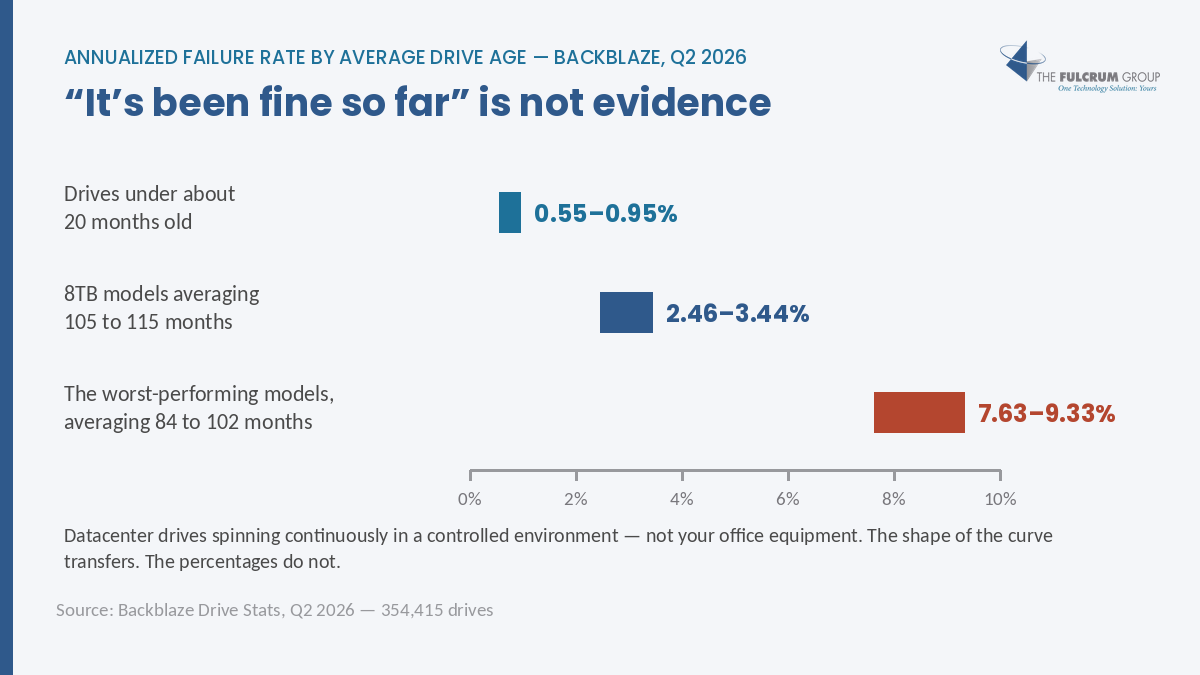
These are datacenter drives spinning continuously in a controlled environment. Your office equipment is not that, and these are not your percentages. What transfers is the shape of the curve: risk stays flat and unremarkable for years and then bends upward sharply. A six-year-old machine is not twenty percent riskier than a five-year-old one.
Which is exactly why “it’s been fine” feels like evidence and isn’t. For most of a device’s life, being fine is what you would expect — right up until it isn’t.
3. Pay attention to the problems you keep paying to fix
The recurring fault is the easiest one to overlook, because each individual instance is small enough to approve without thinking.
Pick one thing that has been repaired more than once this year and add up the last six to twelve months properly:
- Labor billed, yours or ours
- Hours people sat waiting, costed the same way as the coffee-machine arithmetic above
- Work that did not happen, or happened late, or happened twice
- Whatever workaround grew up around it — the second printer, the shared folder, the step everyone adds manually
That total is almost always larger than anyone in the building expected, and it is the number to compare against replacement. Not the price of this one repair against the price of a new unit. The price of a year of this against the price of a new unit.
One pattern worth naming: repeat faults usually cluster on a single root asset. Three unrelated-seeming complaints — a slow application, a printer that drops off the network, a folder that intermittently disappears — turn out often enough to be one aging server or one failing switch that it is worth checking for before replacing three things.
4. The ones with a date already on them
Some of this list is not a judgment call. Someone else set the deadline and it arrives whether or not you discuss it.
The clearest one right now: Windows Server 2016 reaches end of extended support on January 13, 2027. That is from Microsoft’s lifecycle page, and if you are reading this the week it publishes, it is fifty-eight days away.
After that date, no more free security updates. Extended Security Updates exist as a paid option, and as Windows 10 owners learned, that is a meter that runs — a bridge, not a destination.
The same logic covers anything with a date you do not control: software reaching end of support, contract renewals and their notice periods, cyber insurance requirements, compliance obligations in contracts you have already signed. Pull those out of the list first and total them. Then plan the discretionary work with what is left.
Where this usually goes sideways
Replacing the loudest thing instead of the costliest thing. The item people complain about is not reliably the item doing the most damage. The coffee-machine computer produces no complaints at all.
Treating a workaround as free because no one invoices for it. Labor spent inside the building is the easiest cost in a company to not see.
Assuming the dated items will announce themselves. January 13th is on Microsoft’s website. It is not in your inbox.
Replacing the thing without removing the workaround. This is the one that quietly wastes the money. The integration gets built and the duplicate typing continues for another eighteen months, because nobody told the person doing the typing they could stop.
Two things to do this week
Ask three people what they do that they think is stupid. Not what is broken — people report broken. Ask what is tedious, or duplicated, or obviously silly. The people doing the workaround always know. They have usually just concluded that nobody wants to hear it.
Ask whether anything you run reaches end of support in 2027. Server 2016 is the obvious one at fifty-eight days, and it will not be the only one.
This is the work behind Fulcrum’s First Look — an outside read of what you run, how old it is, and what has a date attached — and STARMap, our name for putting those items on a calendar you can actually budget against. It is the same thinking that runs through our managed IT services and managed security work. Familiar problems are easy to overlook, which is exactly why they survive the year-end review. Cheap IT saves cents. Smart IT makes dollars.
Want an outside read before you build the 2027 plan?
Book a First Look and we will go through what you run, what has a date on it, and which of your workarounds is costing more than the fix. A clear picture, and nothing to buy at the end of it.
Call 817-337-0300, email sales@fulcrumgroup.net, or start with the podcast — Talk To Th3 Doc — if you would rather listen first. More like this on the blog.
The Fulcrum Group · Keller, Texas since 2002 · fulcrumgroup.net
Sources
- Texas Business & Commerce Code Chapter 541, the Texas Data Privacy and Security Act, added by Acts 2023, 88th Leg., R.S., Ch. 995 (H.B. 4), effective July 1, 2024 — §541.002(a)(3) applicability, excluding a person that “is not a small business as defined by the United States Small Business Administration,” except to the extent §541.107 applies; §541.101(a)(1) collection limited to what is “adequate, relevant, and reasonably necessary”; §541.101(a)(2) reasonable security practices; §541.107 prior consent required before the sale of sensitive data; §541.151 exclusive enforcement by the Attorney General; §541.154 notice and opportunity to cure; §541.155 civil penalty not to exceed $7,500 per violation.
- U.S. Small Business Administration size standards are set per NAICS code in the table at 13 CFR 121.201, measured by average annual receipts or by number of employees depending on industry, with affiliates counted together. SBA has had revisions to its receipts-based standards in progress during 2025 and 2026, so the applicable figure should be checked at the time of the question rather than assumed.
- U.S. Bureau of Labor Statistics, Occupational Employment and Wages in Dallas-Fort Worth-Arlington — May 2025 — mean hourly wage across all occupations $33.96, against a national figure of $33.54. The 28-hour and $950 figures in this article are our arithmetic applied to that rate, not a BLS finding.
- Backblaze, Drive Stats for Q2 2026 — 354,415 drives; quarterly annualized failure rate 1.73%, lifetime 1.41%; per-model rates by average drive age. Datacenter drives in continuous operation, not office equipment. Accessed October 2026.
- Microsoft Lifecycle, Windows Server 2016 — mainstream support ended 12 January 2022; extended support ends 13 January 2027. Accessed October 2026.

